Servers 1: a control panel for my own servers
How Setu deploys single-binary web apps as hardened systemd services with HTTPS, a database per site, backups and rollback, without containers.
- Setu 0.1.6
- Control panel
- Rust
- // Features
- // Servers
- # Setu
// contents
Summary. Setu is a control panel for compiled web applications on Linux servers I own. An app is a published binary plus a TOML manifest; Setu creates a user, a PostgreSQL database, a hardened systemd unit with cgroup limits, a Caddy route with automatic HTTPS and a nightly backup. Updates back up first and roll back if the new version is unhealthy. The design choice that shapes everything: the control plane never opens SSH. It queues typed commands that agents on each server pick up, and a tiny privileged helper does the only things that need root.
Key facts
| Item | Value |
|---|---|
| Version in this post | 0.1.6 |
| Runtime | Native binaries under systemd (setu-site@<id>.service); no container runtime in the path |
| Binary | One setu binary is the control plane, the agent and the privileged helper, chosen by subcommand |
| TLS | Caddy, programmed over its admin socket, one route per domain; ACME or Caddy's internal CA |
| Per-site isolation | Own Unix user, own database and role, cgroup memory and CPU limits |
| Supported hosts | Ubuntu 22.04, 24.04 and 26.04, Debian 12 and 13; x86_64 and aarch64 |
| Licence | AGPL-3.0-only |
Why build a control panel when containers exist?
Because the thing I run is a single static binary and a database. For that, a container runtime adds a layer I then have to understand, patch and debug, and gives me little I need. systemd already does supervision, resource limits and sandboxing; Caddy already does certificates. Setu is the glue that provisions them in the right order, repeatably, and records what it did.
Interpreted runtimes (PHP, Node, Python) are out of scope for now. Apps that need an interpreter would ship as an image, and the manifest already has a run.kind = "image" field reserved for that. Containers as a runtime are a later phase, not in 0.1.6.
How does an app describe itself?
An app is a TOML manifest per version, and it is the only app-specific knowledge Setu has:
schema = 1

[app]
id = "hello"
name = "Hello"
version = "0.1.0"
health = "/healthz"

[run]
kind = "binary"
args = ["serve"]

[needs]
postgres = ">=16"
dirs = ["notes"]

[env]
HELLO_BIND = { from = "bind_addr" }
DATABASE_URL = { from = "postgres_url" }
HELLO_TOKEN = { generate = "hex32", secret = true }
(Shortened: a full manifest also has homepage and admin_path in [app], names the tarball URL and SHA-256 per architecture, and has limits, backup and update tables.) The contract for the app author is short: ship one static binary in a tarball, read the address to bind and everything else from the declared environment variables, answer 2xx on the health path when ready, and keep state only in the declared directories and the database.
How does a deployment actually run?
control plane (Caddy -> setu serve -> Postgres)
        ^ agents long-poll over HTTPS (outbound only)
managed server
  setu agent run --sudo -n--> setu helper <verb>
     -> Postgres: one database and role per site
     -> Caddy admin socket: one route per domain
     -> setu-site@<id>.service  (cgroup limits)
Provisioning a site is a resumable job: validate, create user and directories, create the database, install the binary, switch the version, write the unit, write the environment, start, health-check, add the Caddy route, verify, finish. Each step is a typed, idempotent command, so a retry after a failure is safe, and a crash in the middle resumes rather than starts over.
Why does the control plane never use SSH?
Pushing over SSH means the control plane holds credentials that can do anything, everywhere, and every failure mode of a long SSH session becomes my problem. Instead, agents make outbound HTTPS requests to the control plane and long-poll for commands, authenticated by a per-server token. The control plane is the source of truth and queues work; nothing connects inward to the managed server.
How small is the root surface?
The agent is not root. It reaches root only through setu helper <verb> --site <id>, with typed JSON on standard input: no paths, modes or owners come from the caller. The helper's verbs use fixed templates and derive every path from the site id, and hostile archives are refused. The whole sudoers file is two lines. A firewall rule keeps the site ports (20000-29999) unreachable from outside, so traffic goes through Caddy.
I will be plain about what this does not give: the helper bounds what root can be asked to do, not who asks. The control plane is effectively root on every server that joins it, so protecting it, its database and its secret key is the job. Sites are untrusted, each running as its own user and writing only its own data/ and run/ directories, but they share the kernel, the local PostgreSQL instance and Caddy.
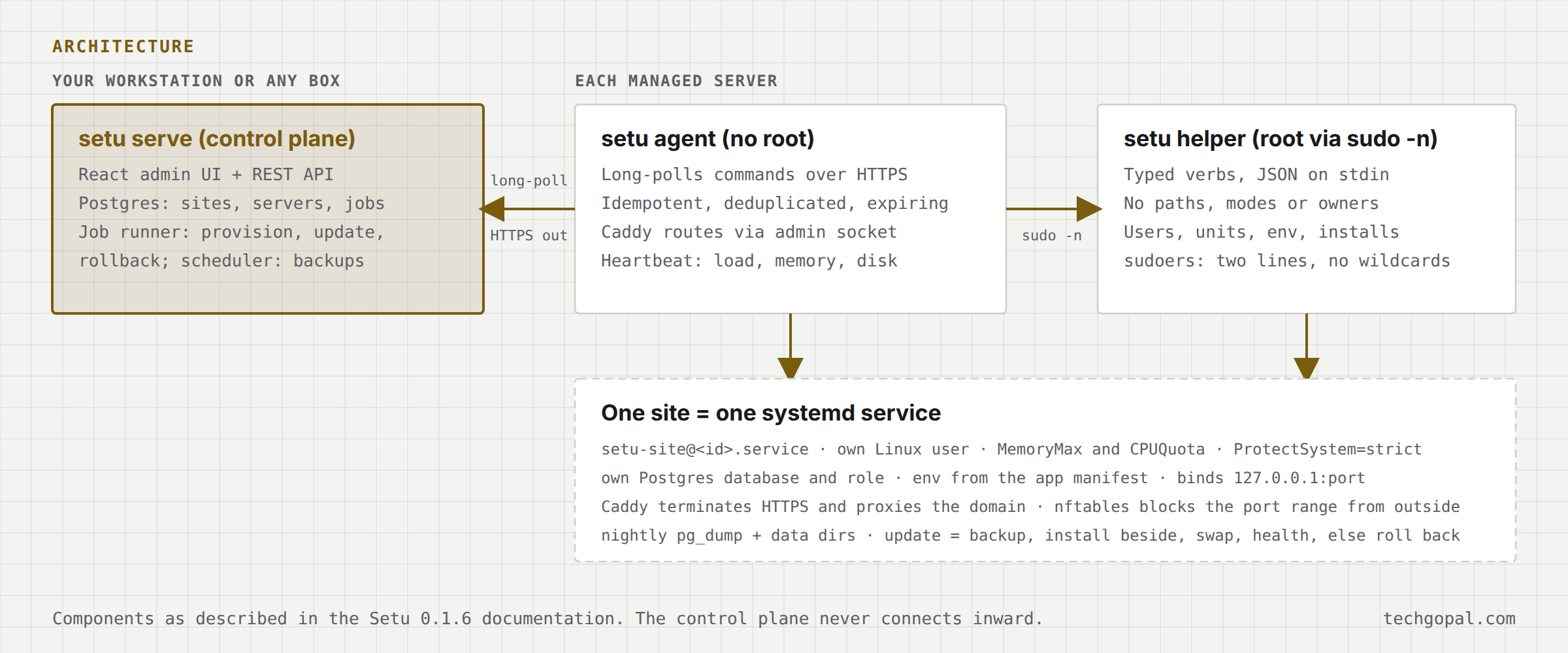
sudo -n, and one systemd service per site. Setu 0.1.6.What happens on a bad update?
An update backs up first. If the new version does not come up healthy, Setu puts the old binary and environment back and, when the new version had already run, restores the database and data directories as well. That last part is the one I care about most: a rollback that leaves a migrated database behind is not a rollback.
What is not in 0.1.6?
Containers as a runtime, moving a site between servers and draining a server, off-box (S3) backups, enforced disk quotas (disk is reported, not enforced), billing and customers, a container image of Setu itself, TOTP, operator API tokens and a CLI client.
What is next in the series?
The last post of this first five is the one that ties the projects together: when one machine is enough, and what that means for a query engine.
Series: 3. Why I built my own CMS · 4. This post · 5. When one machine beats a cluster.
New deep dives by email
One email per post, no spam, unsubscribe any time.