CMS 1: why I built my own CMS in Rust
Why I wrote Vyasa, a Rust CMS with block content, themes as data and sandboxed WebAssembly plugins, instead of running a PHP CMS.
- Vyasa
- Rust
- PostgreSQL
- // CMS
- // Features
- # Vyasa
// contents
Summary. I built Vyasa because I wanted a CMS where the three things that usually go wrong on a content site, plugins, themes and scheduled jobs, are designed rather than inherited. Content is stored as structured blocks, themes are data that cannot run code, plugins run in a WebAssembly sandbox with declared capabilities, and the whole thing is one server binary plus PostgreSQL. Vyasa is pre-1.0 (0.4.1 at the time of writing), running real sites, and it does not run WordPress themes or plugins. The source tree has an importer for WordPress content; the release binaries do not include it yet.
Key facts
| Item | Value |
|---|---|
| What it is | A CMS written in Rust: one server binary plus PostgreSQL |
| Version in this post | 0.4.1 (pre-1.0; APIs may change between minor versions; migrations are forward-only) |
| Content | Structured JSON blocks in a PostgreSQL JSONB column; rendered HTML is a cache |
| Themes | Design tokens compiled to CSS plus sandboxed Tera templates; no server-side code, and browser scripts must be signed |
| Plugins | WebAssembly components under wasmtime, with fuel and memory limits and declared capabilities |
| APIs | REST (OpenAPI) and GraphQL with subscriptions, behind the same permission checks |
| Search | Tantivy, BM25 |
| Licence | MIT or Apache-2.0 |
Why not just use WordPress?
I know WordPress well enough to respect it. The reason is not that it is bad; it is that its central decisions are the ones I wanted to reverse, and you cannot reverse them from inside a plugin.
| What bothered me | What Vyasa does instead |
|---|---|
| Plugins run PHP with full database and filesystem access | WebAssembly plugins in wasmtime; a broker checks every call against the capabilities the plugin declared |
| A theme is executable code, and the built-in theme editor is a way to run code on the server | A theme is tokens, a layout and sandboxed templates; the admin can edit templates and CSS, and neither runs code on the server |
wp-cron runs when someone visits | A background worker and a PostgreSQL-backed job queue |
| Content is HTML with block comments in it | Content is a typed JSON document of blocks; HTML is rendered from it |
| Metadata piles into one key-value table | Typed, schema-validated JSONB fields on each content type |
Search is LIKE | A Tantivy index with BM25 ranking |
| Deployment is PHP, a web server, fpm and files | One binary, the built admin files and PostgreSQL |
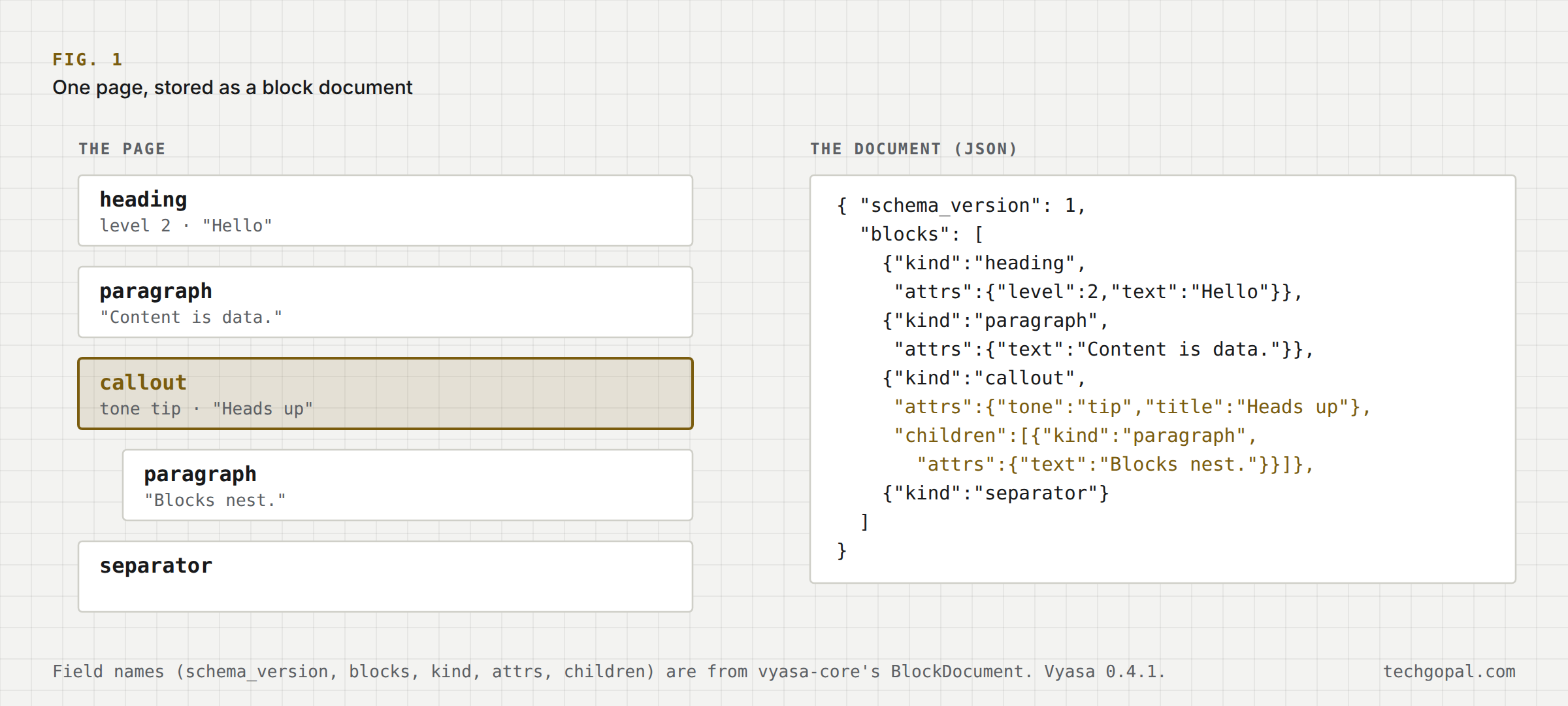
schema_version, blocks, kind, attrs, children) are those of Vyasa's BlockDocument; the content is a made-up example. Vyasa 0.4.1.What does "content as blocks" buy me?
A post is a BlockDocument: a versioned JSON tree. The editor (built on Tiptap, which is built on ProseMirror) and a classic field editor both read and write the same document, so a post opens in either. Because the structure is data, three things get easy: validation (a block either fits its schema or does not), migration (a version number is there for the day the format changes), and machine access (an agent can read a post as structure instead of scraping markup).
The cost is real. Pasting from a word processor needs a conversion step, and every block type has to be designed. I judged that cost worth paying once rather than paying it forever as parsing.
How can a plugin be safe?
A Vyasa plugin is a WebAssembly component built against interface contracts (WIT). The host is wasmtime. A plugin declares the capabilities it needs, such as reading posts or making a network call to one host, and a capability broker checks each call. Execution is limited by fuel and memory, so an endless loop or a runaway allocation ends in an error rather than a hung server. A plugin cannot read what it was not granted.
This is not free either: writing a plugin is harder than dropping in a PHP file, which is why there is a starter template, and a marketplace that every install can browse (it carries themes today).
Where does the layering show up?
Vyasa's crates depend in one direction: common <- db <- core <- {themes, plugins, search, jobs} <- ai <- api. Two rules keep it honest, and most SQL lives in db. The domain crate (core) never imports HTTP or GraphQL types. Only the api crate, the composition root and the vyasa binary, depends on the web framework. Authorization follows the same discipline: every /api/v1 route is registered with an access level, a generated table lists who may call what, and a test matrix proves each guard refuses the roles it should. Decisions about specific things (may this user edit that post?) live in one policy module, so REST, GraphQL and the public site cannot disagree.
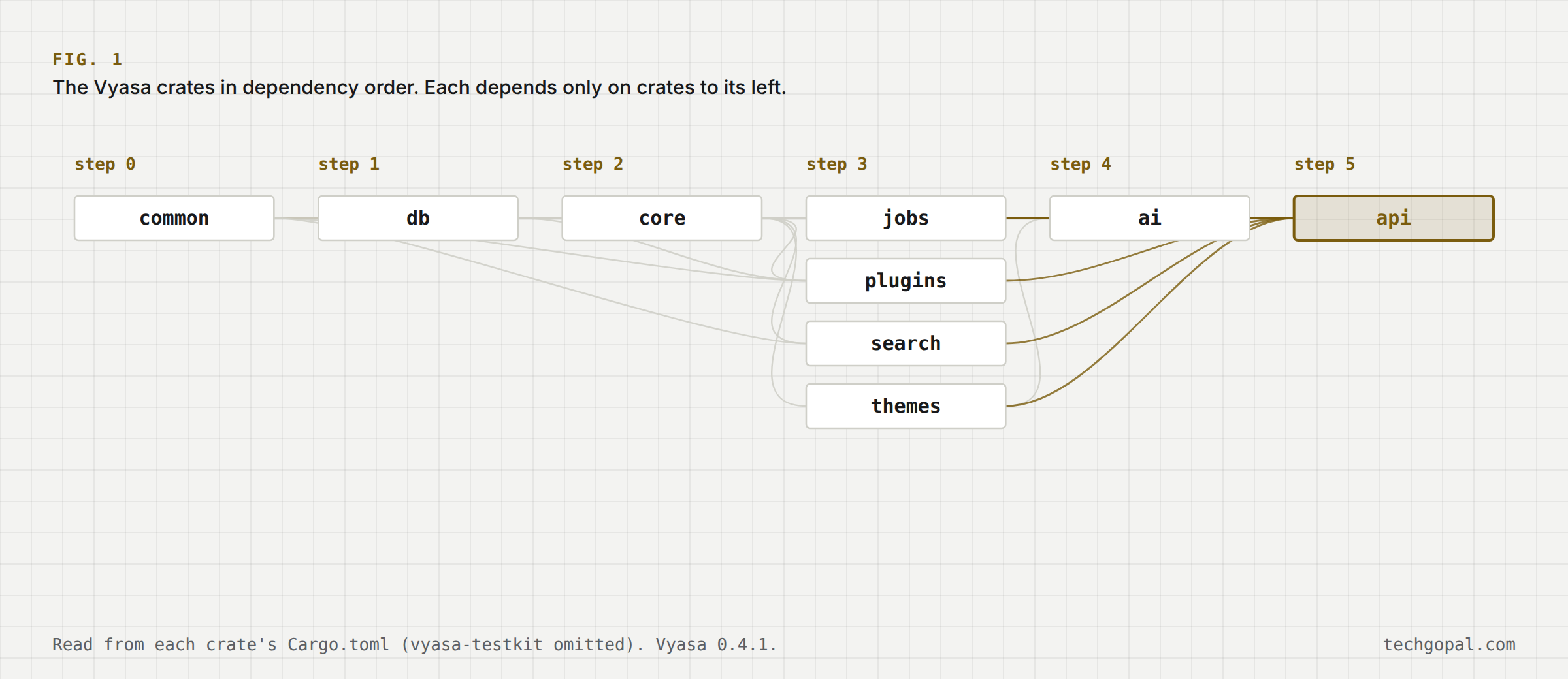
Cargo.toml (the test crate is omitted). Vyasa 0.4.1.| Step | Crate | Depends on |
|---|---|---|
| 0 | common | none |
| 1 | db | common |
| 2 | core | common, db |
| 3 | jobs | common, core, db |
| 3 | plugins | common, core, db |
| 3 | search | common, core |
| 3 | themes | core |
| 4 | ai | common, core, themes |
| 5 | api | ai, common, core, db, jobs, plugins, search, themes |
Why put AI inside a CMS?
Because a content tool is where text is written, and because an agent that manages content should be bound by the same permissions as a person. Vyasa has writing assistance in the editor, a theme studio that designs a site from a description, semantic search and related posts, and an MCP server so agents can work on content under a role. You bring your own provider (Anthropic or an OpenAI-compatible API); there is failover and a cost budget. None of it is required to run a site.
What did it cost, and what is missing?
It is pre-1.0. Back up the database before an upgrade, because migrations only go forward. It is single-site per install by decision, so multi-site means running several instances. The WordPress importer is in the source tree but not in the release binaries yet. The parts I spent the most time on were not the editor but the unglamorous ones: the authorization matrix, a media pipeline that can move to an S3-compatible bucket from the admin without a restart, and release builds for several platforms.
What is next in the series?
The next post is about the server side: how I run Vyasa and my other apps on my own machines with Setu, a control panel for single-binary applications.
Series: 2. Anatomy of a query engine · 3. This post · 4. A control panel for my own servers.
New deep dives by email
One email per post, no spam, unsubscribe any time.